Montag, 13. November 2023

Using Live-Scripting to install Oracle Service Bus

 Since a couple of years, I am already using the live-scripting approach in customer projects. I received a lot of positive feedback, especially for the well-structured and precise documentation in HTML format, that this technique produces. I have been using it in various situations, and it proved to be useful especially for the installation and configuration of Oracle products like Fusion Middleware, Oracle Service Bus and Forms and Reports.

In my new GitHub project, I introduce the installation of a simple OSB architecture using the live-scripting approach.
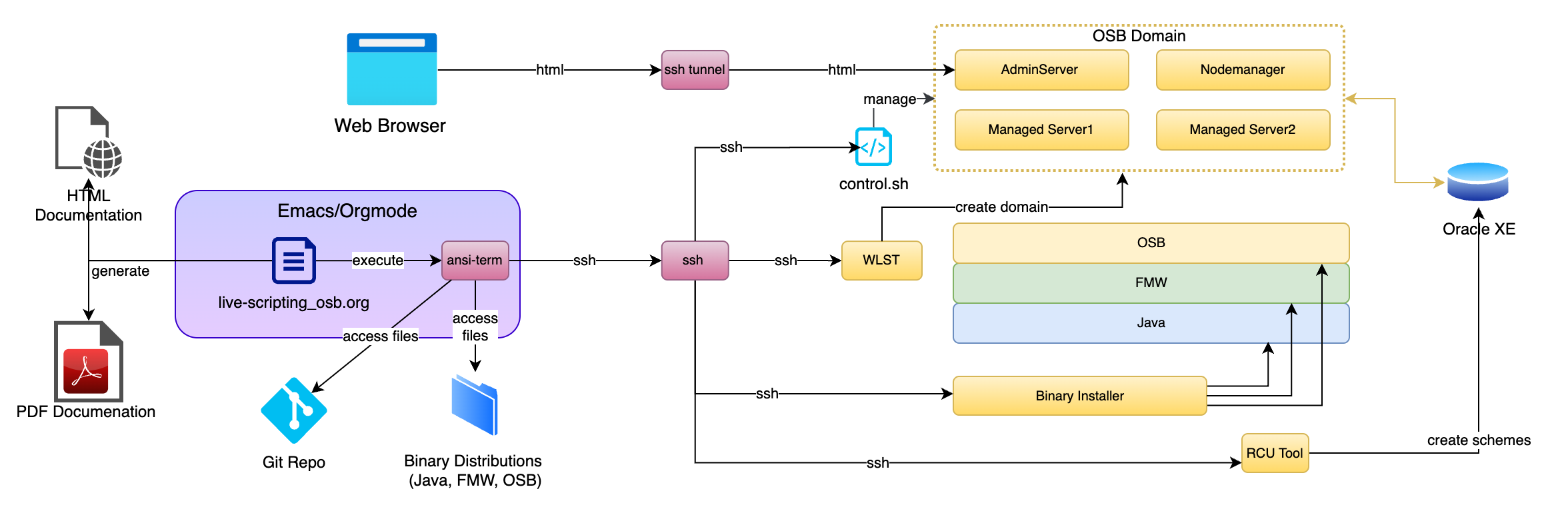
Installation Process of Oracle Service Bus using Live-Scripting

Oracle Service Bus (OSB) is widely utilized, boasting a substantial installation base. Although new projects are currently rare, its complex environment prevails. Expertise is often sought after for version migrations and the integration of new solutions. In the context of Oracle Service Bus (OSB) installation, live-scripting is a powerful approach that combines the execution of command-line operations with detailed documentation to create a reliable and well-documented installation process. Live-scripting benefits OSB installation in the following ways:

Reproducibility: Live-scripting ensures that the OSB installation process is reproducible, meaning that anyone following the documented steps can achieve the same results. This is particularly important in enterprise environments, where consistency and reliability are paramount. Even if the installation needs to be repeated months or years later, the documented process guarantees the same outcome.

Documentation: The process of live-scripting creates precise documentation that captures each step involved in the process. This documentation goes beyond simple command lists; it includes explanations, diagrams, attachments and solutions to potential issues that may arise. This detailed documentation is invaluable for troubleshooting, auditing, and knowledge transfer within an organization.

Quality Assurance: Live-scripting serves as a form of quality assurance. The fact that the documented process has been tested and verified during writing, ensures that the documented solution is reliably working and the chances of errors and misconfigurations is minimal.

Knowledge Sharing: The live-scripting approach makes knowledge sharing much more accessible. Team members can easily follow the step-by-step instructions, regardless of their level of expertise. Even if they don’t want to use Emacs, the solution can be reproduced using a copy-and-paste approach. It accelerates the training process for new team members and can help disseminate best practices across the organization.

Flexibility and adaptability: Live-scripting isn’t limited to a one-size-fits-all approach. It can be adapted and extended as needed. Users can modify the documented process to accommodate unique requirements or make improvements over time without sacrificing the stability and reliability of the installation.

Efficiency: Live-scripting streamlines the installation process by providing a clear and efficient path from start to finish. It minimizes the time and effort required to set up OSB, making it more accessible for both experienced and novice users.

In contrast to a fully automated setup, which is often used in large OSB installations, encompassing hundreds of domains and environments, the approach proposed by live-scripting does not require writing, test and maintain automation code. Live-scripting is best used in situations where only a limited number of environments are required. It ranges between a classical manual approach on the one hand and a fully automated solution on the other. In summary, live-scripting is a powerful methodology in the context of command-line-centered work, especially during OSB installation. It ensures a reproducible, well-documented, and reliable installation process, which is crucial in complex enterprise environments. This approach not only guarantees quality and consistency but also promotes knowledge sharing, adaptability, and efficiency in managing installations.

If I could raise your interest for this subject, please take a look at my GitHub Project live-scripting_osb, which demonstrates the advantages of the live-scripting approach in the context of an OSB installation. If you would like to use the same approach in your own project, you might also be interested in my commercial offerings for OSB projects.

Dienstag, 8. September 2020

Emacs Spreadsheets Demo

 In Emacs Org-Mode kann man Tabellen erstellen und auch Kalkulationen machen. Das Spreadsheet Werkzeug ist natürlich nicht so mächtig, wie  Excel, aber es reicht für schnelle Berechnung. Z.B. kann man damit die Kosten einer Reise kalkulieren. In meinem Youtube-Kanal habe ich ein kurzes Video veröffentlicht, das dieses Merkmal demonstriert. Es werden zwei Szenarien einer Geschäftsreise bzgl. ihrer Kosten verglichen. 


Mittwoch, 22. Juni 2016

Web Single Sign-On with SAML 2.0

While SAML is already widely used in the industry, the configuration within Weblogic Server is complex and in most companies not part of the regular routine. We want to have look at a simple SAML example that was published in an article by VikrantSawant in 2007. This former example demonstrates a Web SSO scenario using SAML 1.1 in Weblogic Server 9.2.
We want to upgrade this example, using SAML 2.0 in Weblogic Server 12.1.3.

This is a tutorial in which we will walk through all the necessary steps to setup and run the SAML 2.0 example. This includes the installation and configuration of weblogic server, creation of two weblogic server domains, installation of the test applications and configuration of the identity provider and service provider domains. To provide a comprehensive overview, the separate tutorial steps are summarized in mind map diagrams. The tutorial comprises a Service Provider initiated flow and an Identity Provider initiated flow, which both will be demonstrated during the testing steps.
As an addition, the tutorial demonstrates the usage of the weblogic feature “virtual user”.


The tutorial was developed and tested on a windows 7 machine. A zip package containing all necessary files is provided at the tutorial website. This also includes a text file with a set of windows commands to help setting up the domains and user configurations. We expect the tutorial to run also on Linux or any other platform supported by weblogic server, although this was not tested.


SAML2_Web_SSO_Tutorial.pdf (ca. 3 MB)


Samstag, 19. Januar 2013

Calculating Checksums for Oracle Downloads


Calculating Checksums for Oracle Downloads

It took me quite a while to figure out which check sum algorithm Oracle is using on some of its download pages. E.g. on the OSB download page, we find the comment “Oracle Service Bus Size: 1.06 GB, Check Sum:1490338751”
This check sum is generated by the old unix tool cksum, which protects for accidental corruption during transport, however is not cryptographically secure. See http://en.wikipedia.org/wiki/Cksum for more details.
On Windows we can use cksum.exe which is included in win32 tools from the project win-bash (http://win-bash.sourceforge.net/).  Calculating the check sum for the OSB download on my machine yields:
D:\17Tools\shell.w32-ix86>cksum.exe D:\01Downloads\ofm_osb_generic_11.1.1.6.0_disk1_1of1.zip
1490338751 1149088683 D:\01Downloads\ofm_osb_generic_11.1.1.6.0_disk1_1of1.zip
The first number is the CRC value which matches the value from the oracle website and the second value is the size in bytes.

Mittwoch, 21. November 2012

Oracle Identity Manager: The Active Directory Connector Tutorial


    In this tutorial we demonstrate the usage of the Active Directory Connector, which integrates a Microsoft Active Directory into Oracle Identity Manager. The underlying scenario is the integration as a result of a company acquisition. All users of the Active Directory are transferred to OIM, which is then used for user management and provisioning of AD accounts. This tutorial includes the installation and configuration of Windows Server and Active Directory, as well as the installation and configuration of the AD connector. We will create an AD structure, using organizational units, users, groups, GPOs (group policy objects) and directory access writes, to model a non-trivial scenario which emulates a real world installations. While we keep the total system still simple, the complexity is already at a level which reveals usability aspects of the connector, which are beyond a mere technical proving of concept. A conclusion summarizes this work and points to areas of further study.

We use the following software versions:
• Oracle Identity Manager Connector MS AD User Management 11.1.1.5.0
• Oracle Identity and Access Management 11.1.1.5
• Oracle Database 11g, Release 2
• Oracle Virtual Box 4.1.22
• Oracle Enterprise Linux 5.8 (32-bit)
• Microsoft Windows Server 2008 R2 (64-bit)
• Microsoft Windows 8 Professional (32-bit)

ADConnectorTutorial.pdf (6,4 MB)

Dienstag, 20. November 2012

Installation of the Oracle Identity Manger


The installation of the Oracle Identity Manager 11g is quite complex and contains some pitfalls that require problem analysis and investigations. In this tutorial we will lead through the installation process of all required product components and development tools. We point out necessary troubleshooting steps and include the analysis of some of the problems. We also provide a detailed list of required installation packages and patches. While analysis during this work was rather time consuming, following the documented steps that circumvent the pitfalls can save a lot of time.

Software versions used:
• Oracle Identity and Access Management (11.1.1.5)
• Oracle SOA Suite 11g (11.1.1.6.0)
• Oracle Weblogic Server 10.3.6 Linux 32-bit
• Java SE Development Kit 6 Update 33 (Linux 32-bit)
• Repository Creation Utility 11.1.1.6.0 Linux
• Oracle JDeveloper 11g (11.1.1.6.0) Studio Edition,  Linux

OIMInstallationTutorial.pdf (4,8 MB)


Oracle Forms and Reports Quick start


During the summer I needed to quickly work myself into Oracle Forms for a business opportunity and I decided to share my experience in form of this quick start guide.
We will look at the installation process on Windows and Linux in a development and production configuration. To work with the Forms samples we install an Oracle Express Edition Database. We will look at the basic operations and a database tutorial to get acquainted with this edition. We also look at an Application Express Example, Oracle’s quick and simple approach to database applications. We will use the development configuration to run through the Forms tutorial “Creating a Master-Detail Form”, which ships with the product. Eventually we will look at a Forms and Reports installation in a high-availability configuration. We propose a setup on two virtual box Linux machines and provide an action plan for its installation.

Software Versions used:
  • Weblogic Server 10.3.6 Generic
  • JRockit 64-Bit for Windows R28.2.4
  • Oracle Forms and Reports 11g Release 2, Windows 64-bit
  • Oracle Database Express Edition 11g Release 2
  • Oracle Linux Release 5 Update 8 for x86_64 (64 Bit)
  • Java SE Development Kit 6 Update 33 for Linux x64
  • Oracle Forms and Reports 11g Release 2 for Linux 64 bit
  • Oracle SQL Developer 3.1 (3.1.07.42). 

Samstag, 27. Oktober 2012

Upgrading Vista to Windows 8 on Virtual Box


I still have an old Windows Vista license which I installed on an Oracle Virtual Box machine. However it performs so poorly that it is hardly usable, even on a modern quad core CPU system. Yesterday Microsoft offered an Upgrade from several Windows versions, including Vista, to Windows 8 Pro for 29,90  Euro. I decided to try an upgrade.

We will look at the download and installation process. We actually install the German version of Windows 8 and provide the screens of the dialogs.
Windows8_on_VBox.pdf (2,3 MB)


Mittwoch, 25. Juli 2012


Installation of Oracle Linux 5.8 on Virtual Box 4.1 with Guest Additions


Today I wanted to install Oracle Linux on virtual box, which I need for some testing systems. Since the installation and especially the setup of the guest additions were not as smooth as I expected, I decided to share the information.


InstallingOracleLinux58.pdf (1.5 MByte)


Samstag, 14. Juli 2012


WS-Security unveiled

One of the more complex examples that ship with WLS is a WS-Trust based authentication of a web service using SAML assertions. This example is quite easy to setup and run and the example’s documentation gives a basic understanding of what is going on. But we want to look deeper and shed light on the complexity that is hidden behind SSL, WS-Trust and SAML authentication. In a first step we separate the scenario from the example server and integrate it into eclipse, to create an isolated laboratory environment for further investigation. We will use Wireshark to analyze the actual flow of messages on the wire. We even look inside the SSL streams to identify the WS-Trust tokens and SAML assertions as they are passed between the participants.


Updated Links

Text file containing the output from building and running the project:
WLS example documentation as PDF:
Eclipse project file:

Dienstag, 3. Juli 2012

This part of the toolbox series introduces the Mini-IDE project. It is designed to instantly setup a weblogic server together with a small sample application. It provides everything to setup and run the example in less than five minutes. Despite its simplicity, it contains everything to build and deploy a Java EE web application, relying on not more than a WLS installation. It can easily be modified and used in analysis situations or as a starting point for proof of concepts. In environments where access is restricted to shell usage, we provide a distribution method based on copy and paste via the clipboard. 

Montag, 16. April 2012

OEPE JavaEE Lab Tutorial for JSF


We want to look at a simple tutorial from the Oracle web site which demonstrates how to
develop a simple JSF web application with Eclipse and the Oracle Enterprise Pack for
Eclipse. Since this tutorial is targeted to WLS 10.3 there are some modifications to be made,
in order to run it with WLS12c and OEPE 12c. We take a brief look at the example itself and
point out the changes.

OEPE_JSF_Intro.pdf (93 KB)

Donnerstag, 12. April 2012

OEPE Hands on Labs for WLS 11g

After some frustrating moments, trying to quickly going through the OEPE 11g Hands-on-Labs for Web-Services on WLS12c, I spent some time with problem analysis and eventually confirmed that the labs still run with the latest versions of WLS and Eclipse. We will present a graphical overview of each lab and  note some required changes for the version OEPE 12c.

OEPE_Hands-on-Labs.pdf (925 KB)

Donnerstag, 5. April 2012


Setting up a WLS-Webservice Example in Eclipse


I like the API Examples that ship with WLS because they contain a level of complexity that is just enough to demonstrate the technology slice at hand. In other words, they are kept very simple. Therefore they are an excellent starting point for small test applications that can be used in very complex environments. We want to look at the Example: “Creating a Web Service from an Existing WSDL File”. We demonstrate how to quickly integrate it into Eclipse with full support of code completion, context sensitive help and on-the-fly compilation support. 

Mittwoch, 14. März 2012


WLS12c and the Oracle Enterprise Pack for Eclipse     
The Oracle Enterprise Pack for Eclipse extends the IDE to tailor it to the use with WLS. It contains a number of editors and features which makes the interworking smoothly. We will have a look at the OEPE and how it plays together with WLS12c on an OSX installation.
WLS ships with ready to use and configured examples. We will look at one example that demonstrates JavaEE6 features. We want to use Eclipse not only to analyse the examples, but also demonstrate a setup as an Eclipse project to go through the full edit – compile –install- test cycle. This exemplifies the usage of the WLS examples as mini projects, which can be used in situation where we want to run simple tests or in prototyping situations.

Montag, 13. Februar 2012


WLS12c on OSX
The new version of WLS also ships for Mac OSX. We look at the installation on a MacBook Pro running Snowleapard. We start the example server and do a full de-installation afterwards.